Breaking: Microsoft Releases Unified Python Environments Extension for VS Code After Year-Long Preview
Microsoft today announced the general availability of its Python Environments Extension for Visual Studio Code, ending a year-long preview period. The extension automatically replaces existing environment workflows for all VS Code users within the next few weeks, or can be enabled immediately via the setting python.useEnvsExtension.
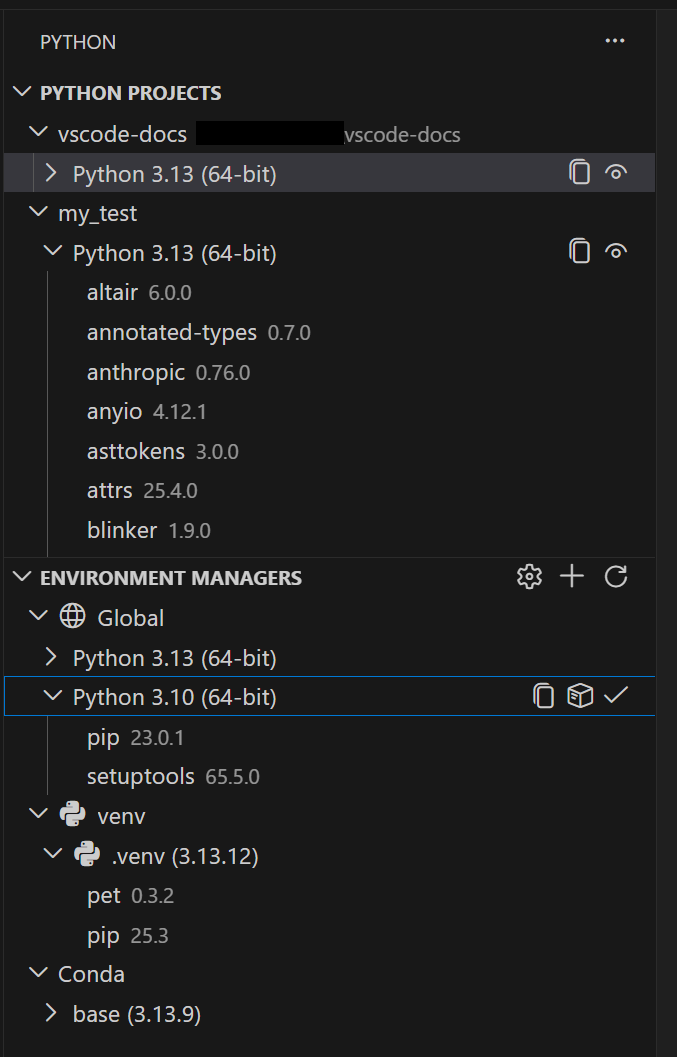
The extension provides a single, consistent interface for managing Python interpreters, packages, and environments — regardless of whether they were created with venv, conda, pyenv, poetry, or pipenv. No setup is required: environments are discovered automatically when a Python file is opened.
“This extension addresses the fragmentation that has long frustrated Python developers,” said Amanda Silver, Principal Product Manager for Python at Microsoft. “We’ve listened to community feedback for over a year, and the result is a tool that ‘just works’ — making environment management as simple as opening a file.”
A Unified Environment Experience
At the core of the extension is PET (Python Environment Tool), a Rust-based scanner that quickly locates environments by checking the system PATH, known installation directories, and user-configured search paths. PET has already powered environment discovery in the standard Python extension; the new extension adds a dedicated UI around this proven engine.
Users can create, delete, switch, and manage environments from a single panel — regardless of the underlying tool. For environments stored in non-standard locations, workspace-level search paths with glob patterns can be configured, as well as global search paths for shared directories.
Faster Environment Creation with uv
If the uv tool is installed on the system, the extension automatically uses it to create venv environments and install packages. This integration is enabled by default via the python-envs.alwaysUseUv setting and significantly speeds up operations, especially in large projects.
Two new creation modes simplify getting started:
- Quick Create — A single click (+ button in the Environment Managers view) builds an environment using the default manager, latest Python version, and any workspace dependencies found in
requirements.txtorpyproject.toml. - Custom Create — Accessed via Python: Create Environment in the Command Palette, this lets users choose the environment manager, Python version, environment name, and which dependency files to install from.
venv and conda support direct environment creation from VS Code; for other managers (pyenv, poetry, pipenv), the extension discovers environments created via their respective CLI tools.

Python Projects: Environments That Match Your Code Structure
A new feature called Python Projects allows developers to map environments to specific folders or files. This solves a common pain point in monorepos and multi-project workspaces, where different parts of the codebase require different Python versions or dependency sets.
“Developers working in monorepos often struggle to keep environments aligned with the correct sub-projects,” noted Silver. “Python Projects eliminates guesswork — the environment is automatically tied to the folder you’re working in.”
Background
Historically, Python environment management in VS Code has been fragmented across multiple tools — venv, conda, pyenv, poetry, pipenv — each with its own workflow and UI. Users frequently had to switch between CLI commands and extensions to create, activate, or delete environments, leading to confusion and lost productivity.
Microsoft began addressing this with the Python Environments Extension preview in early 2023, gathering feedback from thousands of developers. The preview refined the automatic discovery engine, integrated uv for speed, and added the Python Projects concept. Today’s general availability marks the culmination of that effort.
What This Means
For the estimated 15 million VS Code users who write Python, this extension simplifies one of the most error-prone aspects of Python development. Newcomers can avoid learning the differences between environment managers; experienced developers gain a unified control panel and faster setup times.
“This is a huge win for Python productivity in VS Code,” said Dr. Sarah Chen, a senior data scientist and early preview user. “I no longer have to remember which tool created which environment — it’s all in one place. The uv speed improvement alone saves me minutes per project.”
The extension will roll out automatically over the next several weeks. Users who wish to activate it immediately can set "python.useEnvsExtension": true in their VS Code settings.
— Reporting by the VS Code team and community contributors.